For iPhone, Android and the web
Do it once.
Or do it daily.
Tasks, habits, and projects in one calm place. ogoria keeps the rhythm so you can keep the promise.
Free to start. No ads, no tracking, no streak guilt.
The idea
Some things you do once.
Some you do over and over.
Most tools flatten both into one list, then treat every miss the same way. ogoria holds them apart, right down to the shape of the checkbox.
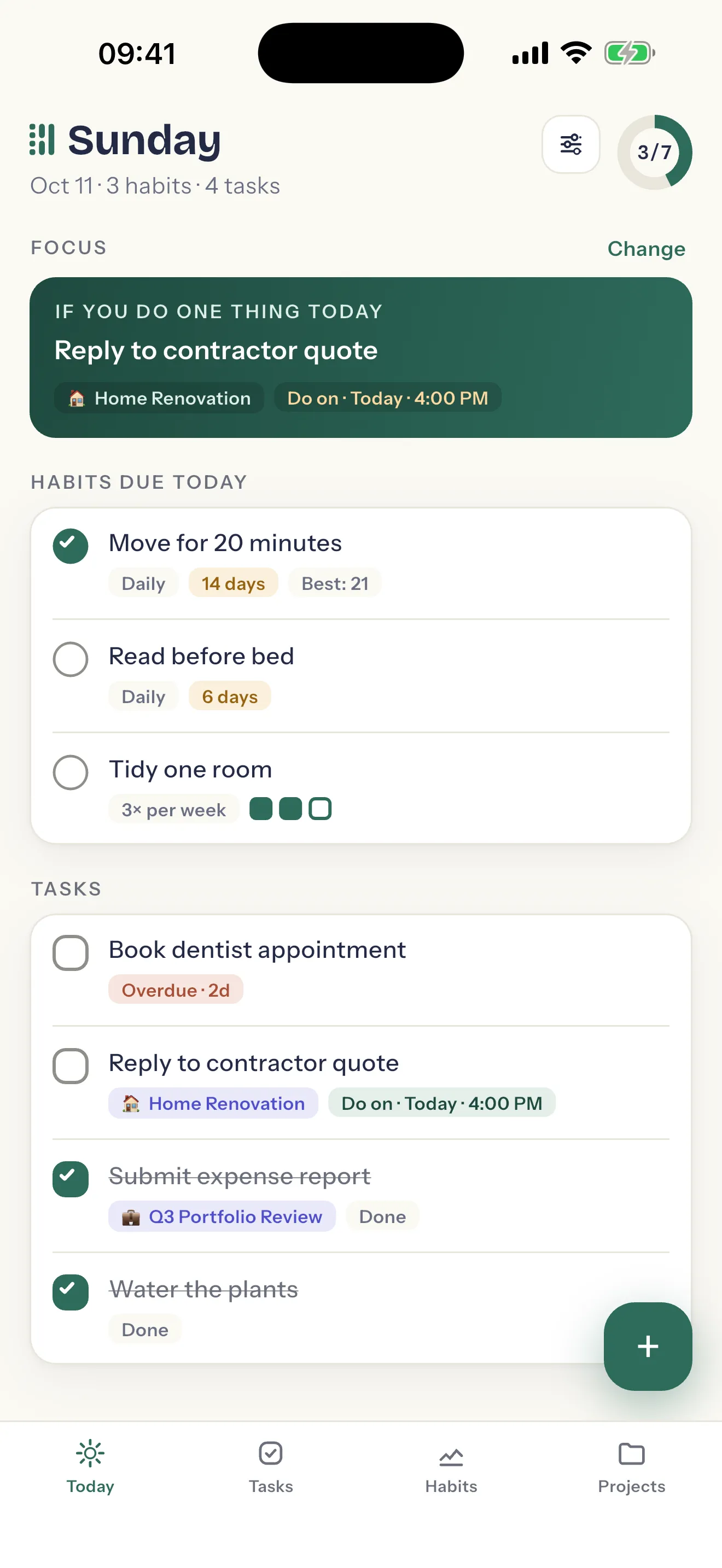
A task is square
Discrete. Completable. Done once, then gone.
- Do on a day — it shows up that morning.
- Do by a date — it carries the days left.
- Anytime — no date, no pressure, still on the list.
- Close it without doing it — not needed, too late, cancelled — and the reason is kept.
Only a genuinely late one-off ever turns clay. It has to have actually slipped.
A habit is round
Cyclical. Returning. Measured, never finished.
- Daily means daily — no day picker, no target to negotiate.
- Weekly — three times a week, on whichever days suit the week.
- Monthly — once a month, or as many times as you mean it.
- Ongoing, or for a set run if you want an end date on it.
A missed day lowers a rate. It never turns red, and it never piles up.
Every morning
Mornings start calm.
Evenings actually end.
Today gathers what's due now — the habits that come round today and the tasks that land on it — and nothing else. Everything later waits in its own tab, where it can't stare at you over breakfast.
The ring counts items
Not percent. 3 of 7 is concrete and finite — a day you can actually finish, and see yourself finishing.
One Focus, suggested
If you do one thing today, make it this. Change it for another, or ignore it. It is a suggestion, never a demand.
Then it tells you to stop
When the ring closes, the screen says so and hands the evening back. Tomorrow can be peeked at, and not touched.
Your evening is yours.
Tasks
Every task says when.
None of them shout.
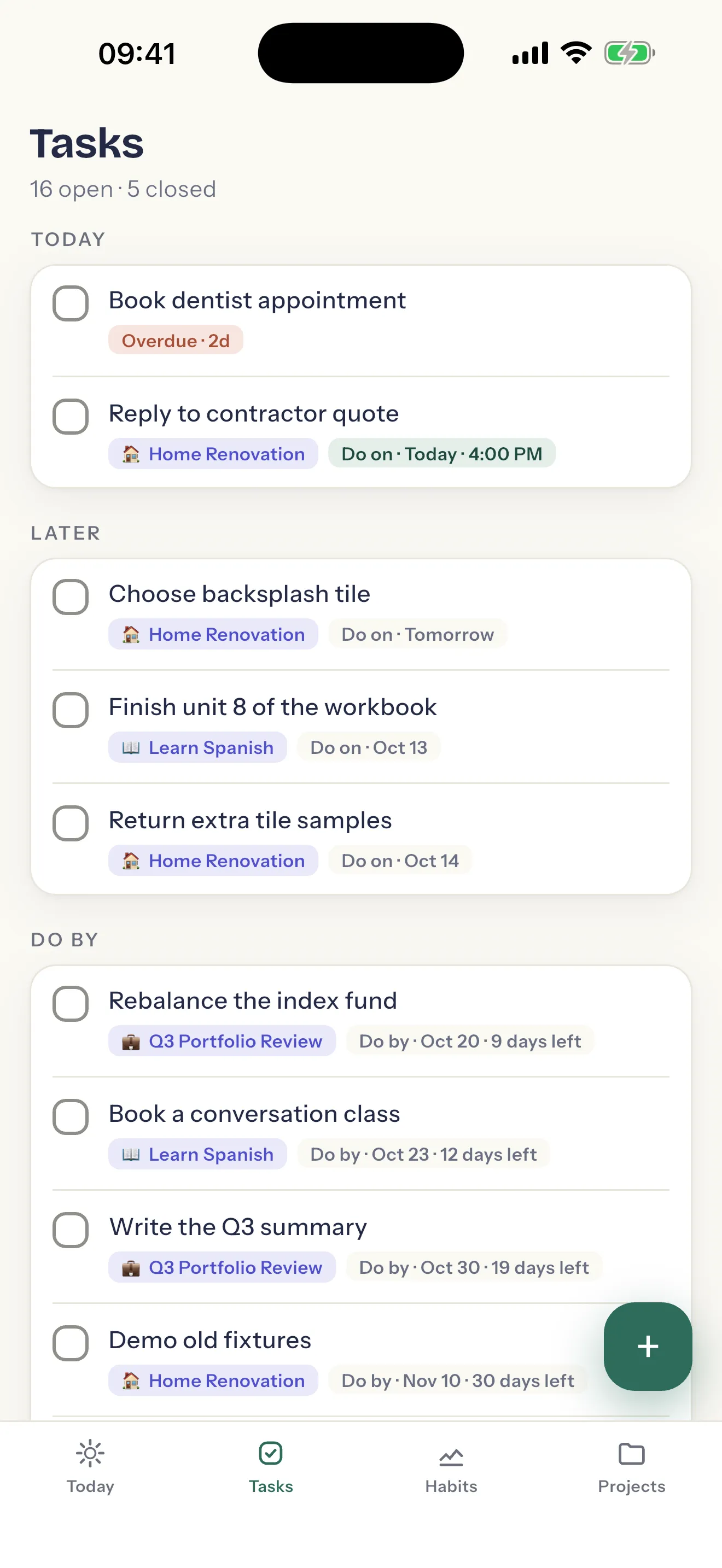
The Tasks tab sorts itself by the only question that matters on a busy day: what is today, what is later, and what has a deadline coming.
- Days left, not alarms. A deadline counts down in plain numbers — 9 days left, 12 days left. Nothing turns red until a task has genuinely slipped.
- Move to tomorrow. Right from the task, with no judgement. A plan that changes is still a plan.
- Waiting on someone. Name who you're waiting for, so a stalled task explains itself.
- A reminder when you want one. At the time you pick, from your phone itself — and never about a streak.
The promise
A missed habit lowers a number.
It never breaks you.
A streak is a chain, and a chain only breaks. A rate recovers. That is the whole argument, and it is built into how ogoria counts rather than bolted on as a setting.
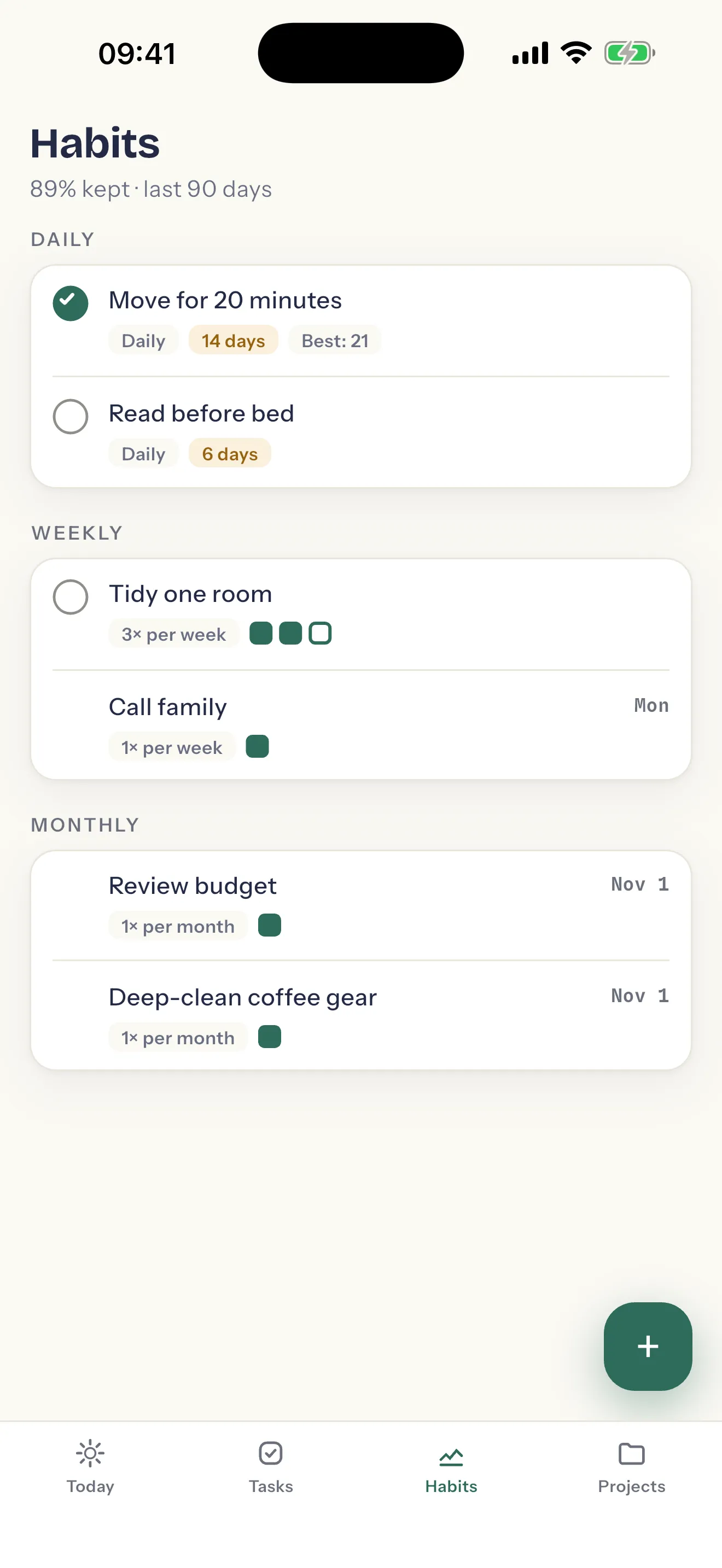
- The rate leads. The Habits tab opens on how much you kept over the last 90 days. One bad week costs a few points, not three weeks of effort.
- Streaks, kept gently. Your current run and your best one, in gold — the one colour that only ever means you kept a rhythm.
- Pause. Going away, or unwell? Pause the habit. It waits, and the days away count neither for it nor against it.
- Habits are never overdue. The word doesn't apply, so the colour never appears.
We will never use guilt to make you productive.
Bigger things
Projects hold work
with a finish line.
A trip to plan, a room to renovate, a course to finish. A project gathers the tasks that get it done, and keeps the reason you started where you can see it.
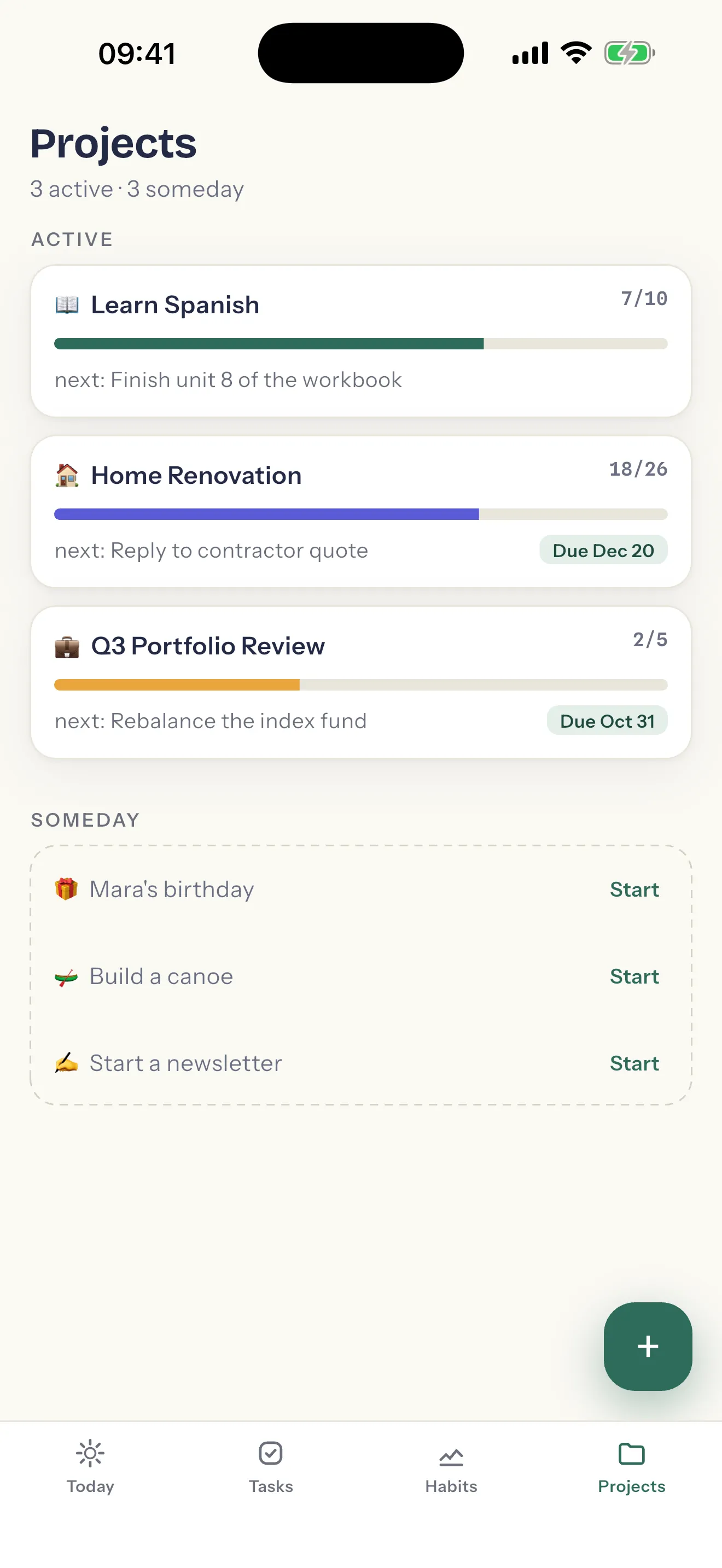
- It knows what's next. Each project card carries its next task, rather than making you go and find it.
- Progress you can count. 18 of 26, with a bar — the same honest numbers as the rest of the app.
- Someday, without the guilt. Park a project you're not ready for. It waits, out of the way, until you start it.
Why we built it
You have promised yourself things. Small ones — twenty minutes of moving, a call home on Sundays. Large ones — the kitchen, the language, the year you finally review the budget before the budget reviews you.
Somewhere along the way, the tools meant to help began keeping score against you. They painted your missed days red. They threatened your streaks at midnight. They confused your attention with your progress, and they wanted the attention.
We think a promise to yourself deserves better company.
So we built a quieter machine. It knows the difference between the thing you do once and the thing you do over and over, because those are different promises. It measures rhythm, not perfection — a rate recovers; a broken chain just breaks. It celebrates in a whisper and never punishes at all. It tells you when the day is done, and it means it: your evening is yours.
It will not make you a different person by Friday. It will make you a slightly steadier one by spring — and it will show you the evidence, gently, in gold.
Do it once. Or do it daily. Either way, we'll keep the rhythm — so you can keep the promise.
Pricing
Free for the daily loop.
Pro for the long haul.
Nothing that plans or finishes a day is behind a payment. Pro is for when your life has more rhythms and more projects than the free plan holds.
Free
Free, for good
Not a trial, and it does not run out.
- Unlimited tasks, with every kind of date.
- 3 habits — daily, weekly or monthly.
- 1 active project, and as many parked in Someday as you like.
- Today, streaks, reminders, the dark theme, and the full export.
ogoria Pro
Room for every rhythm
Monthly or yearly, on a phone or on the web.
- Unlimited habits.
- Unlimited active projects.
- The price is shown before you buy anything, in your currency.
- Cancel where you bought it. When Pro ends, nothing is deleted and nothing is locked.
Yours
Nothing shared, sold, or social.
The trust posture isn't a policy page. It's how the thing is built.
Exports completely
Everything in your account, in CSV or JSON — tasks, habits, projects. On a phone it goes to the share sheet, in a browser it downloads, so it lands wherever you send it, never through us.
Deletes completely
Delete the account and everything in it goes too, at once. Two steps from settings, with the export offered first. How deletion works
Tracks nothing
No analytics, no ads, no advertising identifier, no crash reporter watching over your shoulder. We don't know which screens you open, and we built it so we don't need to.
Questions
The honest answers.
Where can I get ogoria?
On iPhone and iPad from the App Store, on Android from Google Play, and in a browser at app.ogoria.com. One account carries your rhythm between them. Open ogoria in your browser
Do I need an account?
Yes. Pick your first habits before anything else; then a free account keeps them — the same rhythm wherever you sign in, on a phone or in a browser, and your history kept through a new or lost phone. Sign in with Apple on iPhone and iPad, with Google, or with your email address and a password or a one-time code.
What happens to my data?
It's yours. It is held in your account on our servers, and Export everything in Settings writes all of it — tasks with their closed-with-reason history, habits with their completions, projects — to CSV or JSON whenever you like. Nothing is shared, sold, or used to train anything.
Will it nag me about streaks?
No. You choose per-item reminders at the time you set, or silence — and silence is a first-class answer, not a dark corner of settings. Nothing in ogoria ever warns you a streak is about to break.
What does it cost?
The free plan is not a trial: unlimited tasks, three habits, one active project, and the whole daily loop. ogoria Pro lifts the habit and project caps, monthly or yearly, everywhere you sign in. It is bought in the app on iPhone or Android, or in the web app, and the price is shown before you buy anything: in your store’s currency on a phone, and with VAT included on the web.
How is this different from a to-do app?
A to-do app treats a habit like a task that keeps coming back, then marks it red when you miss. ogoria knows those are different promises. A task is done once and gone. A habit is measured by a rate that recovers.
How do I delete my account?
In the app: Settings, tap your address, then Delete account & data. It offers you an export first, and confirming deletes everything at once. If you no longer have the app, email us from the address on the account. Everything about deleting your account
Do it once. Or do it daily.
ogoria is free to start on iPhone, Android and the web. Pick your first habits before anything else, and have your first day planned in a minute.